


 Sign in with LinkedIn
HP ZBook Studio G8 Review
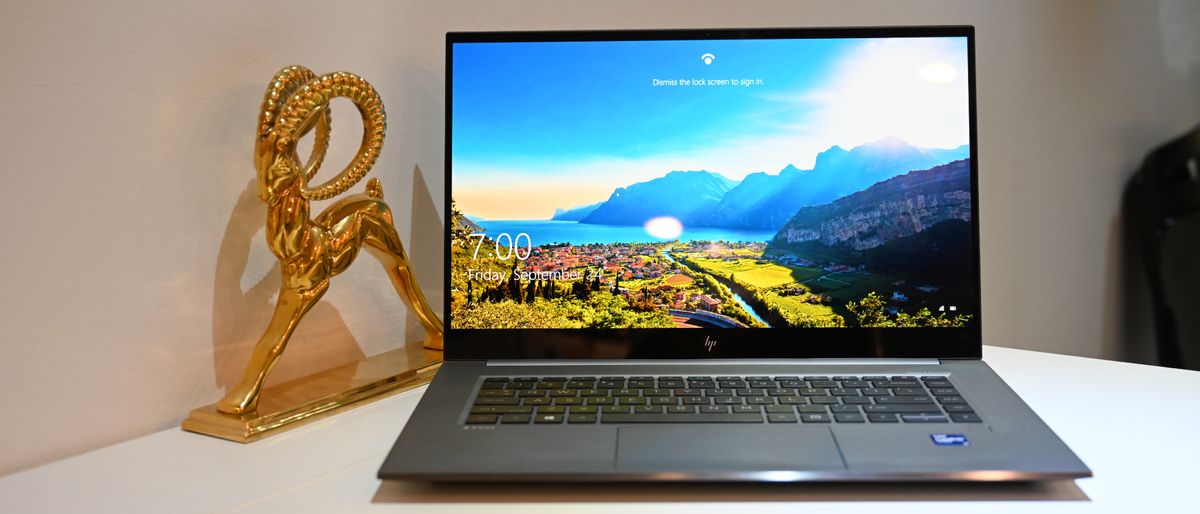
Content creator mobile workstations are an essential tool in the design/creative fields and this review of the HP ZBook Studio G8 shows why it's an easy choice. It comes complete with an 11th-Gen Intel Core i9 processor, 32GB of RAM and features 2TB of SSD storage. Read the blog.
Frequently Asked Questions
Who is the HP ZBook Studio G8 designed for?
The HP ZBook Studio G8 is built primarily for content creators and creative professionals who need workstation‑class performance in a relatively light, portable system.
It’s a good fit if you:
- Spend a lot of time in Adobe Creative Cloud (Premiere Pro, After Effects, Photoshop, Lightroom), DaVinci Resolve, Capture One, or similar tools
- Need reliable 4K video editing, color‑critical photo work, or 3D/visual work on the go
- Want a machine that can double as a capable gaming laptop after hours
Key characteristics that make it suitable for this audience:
- Performance: Up to an 11th Gen Intel Core i9‑11950H CPU, 32GB RAM, 2TB NVMe SSD, and Nvidia GeForce RTX 3070 GPU with 6GB VRAM. In Geekbench 5.4, it scored 9,034 vs a premium‑laptop average of 4,753. It transcoded 4K to 1080p in 6:33, far ahead of the 14:47 average.
- Display: Optional 15.6-inch OLED 4K multi‑touch panel with Gorilla Glass 6, covering 142.5% of the DCI‑P3 color gamut and reaching 464 nits of brightness—useful for color‑sensitive work.
- Portability: At about 13.9 x 9.2 x 0.7 inches and 3.3 pounds, it’s lighter than many competing creator workstations.
- Durability and security: MIL‑STD 810G tested, with a fingerprint reader, Windows Hello webcam, TPM 2.0, HP BIOSphere Gen 6, BitLocker, HP Sure Click, HP Wolf Security, and Tile tracking.
It’s less ideal if you:
- Prioritize long battery life over raw performance (it lasted about 4 hours 56 minutes in a web‑browsing test vs a 10:23 category average)
- Are highly sensitive to fan noise and heat under load
- Are on a tight budget (the reviewed configuration was priced around $4,727, while the base model starts near $2,479)
If you need a durable, performance‑focused mobile workstation for creative workloads and can live with shorter battery life and a higher price point, the ZBook Studio G8 is a strong option to consider.
What are the key specs, configurations, and pricing options?
The HP ZBook Studio G8 is available in several configurations, with a noticeable gap between the base model and fully loaded options.
Base configuration (approx. $2,479):
- CPU: 11th Gen Intel Core i7‑11800H
- GPU: Nvidia T1200 with 4GB VRAM
- RAM: 16GB
- Storage: 512GB NVMe SSD
- Display: 15.6-inch FHD (1920 x 1080) IPS, anti‑glare, 400 nits
Reviewed configuration (around $4,727):
- CPU: 11th Gen Intel Core i9‑11950H
- GPU: Nvidia GeForce RTX 3070 with 6GB VRAM
- RAM: 32GB
- Storage: 2TB NVMe SSD
- Display: 15.6-inch OLED 4K multi‑touch (3840 x 2160), Gorilla Glass 6
Physical design and ports:
- Chassis: All‑aluminum, “turbo silver” finish with a low‑profile, 0.7‑inch‑thick design
- Weight: About 3.3 pounds
- Dimensions: 13.9 x 9.2 x 0.7 inches
- Ports:
- Left: 3.5mm combo audio jack, USB‑A, Nano security lock slot
- Right: SD card reader, two USB‑C ports, Mini DisplayPort, AC power jack
Display performance:
- Color gamut: 142.5% DCI‑P3 (vs 84.4% premium‑laptop average)
- Brightness: 464 nits on average (vs 384‑nit category average)
Storage and file performance:
- 25GB file duplication in 22.8 seconds
- Transfer rate: ~1,175.81 MB/s (faster than many peers, though one competitor reached ~1,635.52 MB/s)
Battery and thermals:
- Battery life: About 4 hours 56 minutes in continuous web browsing at 150 nits (shorter than the 10:23 category average)
- Fast charge: Up to 50% in about 30 minutes
- Thermals: Underside reached ~112.6°F in testing (above the 95°F comfort threshold); keyboard center around 98.8°F; touchpad around 82.4°F
Warranty and software:
- Warranty: 3‑year limited warranty
- Key HP software: HP Client Security Manager, HP Audio Control, HP Sure Click Secure Browser, Omen Gaming Hub, HP Quick Drop
In practice, you’re choosing between a more accessible i7/FHD configuration and a premium i9/RTX 3070/4K OLED setup. The right choice depends on how demanding your workloads are and how much you value the OLED 4K panel and higher GPU performance.
How does the ZBook Studio G8 perform in real work and play?
The ZBook Studio G8 is built to handle demanding creative workloads and can comfortably support modern games, with some clear trade‑offs in battery life and heat.
Real‑world creative performance:
- Multitasking: In testing, it handled 50+ Chrome tabs (including multiple YouTube streams), a Google Doc, and Capture One exports simultaneously without noticeable slowdown.
- Benchmarks:
- Geekbench 5.4 overall score: 9,034 (vs 4,753 premium‑laptop average)
- Handbrake 4K to 1080p transcode: 6 minutes 33 seconds (vs 14:47 average)
- File handling: A 25GB multimedia file duplicated in 22.8 seconds at ~1,175.81 MB/s.
- GPU‑accelerated work: The Nvidia GeForce RTX 3070 with 6GB VRAM handled Adobe Premiere, DaVinci Resolve, and Capture One smoothly, with minimal lag when tethered shooting.
Gaming performance:
- Civilization VI: Gathering Storm benchmark
- 1080p: 79 fps
- 4K: 64 fps
- Both results are well above the 32‑fps premium‑laptop average.
- In titles like Borderlands 2 and WRC 10, the system maintained around 60 fps on the 60Hz display.
Audio, input, and experience:
- Speakers: Bang & Olufsen‑tuned speakers deliver clear vocals and decent bass for a laptop. For professional audio work, external speakers, headphones, or a USB mic are still recommended.
- Keyboard: RGB‑lit chiclet keyboard with good travel and feedback. In typing tests, speeds reached 96 wpm with 94% accuracy, above typical personal averages.
- Touchpad: 2.8 x 4.5 inches, responsive, and supports Windows gestures like two‑finger scroll and pinch‑to‑zoom.
Trade‑offs to consider:
- Battery life: Around 4:56 in a web‑browsing test at 150 nits—noticeably shorter than many premium laptops. You’ll likely want to stay near power for long editing or gaming sessions.
- Heat and fan noise: Under sustained load (video transcoding, gaming), the underside can reach ~112.6°F, and fans become clearly audible. The touchpad and palm rest stay cooler, but this is not a “lap‑friendly” machine under heavy use.
- Webcam: 720p, color‑accurate in good light but soft and noisy in low light. For frequent video calls or streaming, an external webcam will give better results.
In summary, if your priority is fast rendering, smooth editing, and strong GPU performance in a portable chassis—and you’re comfortable managing power, thermals, and price—the ZBook Studio G8 can reimagine how you work on the move. If you need all‑day battery life or a very quiet system under load, you may want to weigh alternatives or step down to less power‑hungry specs.